
Download VoicePass PC Lock – voice password, voice recognition, secure computer, pc lock, voice authentication, voice unlock, pc security, voice login, secure access, voice based security
Overview
VoicePass PC Lock is a security-focused application designed to enhance computer protection through voice-based authentication. It allows users to replace traditional passwords with personalized voice passwords, simplifying access while improving data security. The app targets individuals and professionals who prioritize privacy and seek a more intuitive method of securing their Windows systems.
By leveraging voice recognition technology, VoicePass eliminates the need to remember complex credentials, reducing the risk of password fatigue and unauthorized access. Its core function is to lock and unlock a PC using voice commands, making it ideal for users who value both convenience and security. The developer, VoicePass Inc., has positioned the app as a tool for personal and professional use, particularly in environments where sensitive information must be protected.
Real-world applications include securing home computers, office workstations, and shared devices in educational or corporate settings. As part of the broader security software ecosystem, VoicePass PC Lock introduces a biometric alternative to conventional login methods. While the developer did not provide additional technical details about the underlying algorithms or data handling, the app’s core functionality is clearly defined.
Its presence in the market reflects a growing trend toward voice-enabled security solutions, offering a practical option for users seeking a seamless and secure computing experience.
Key Features & Functionality
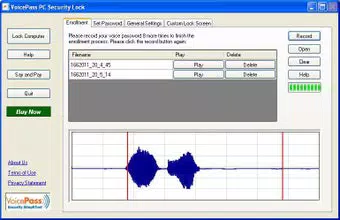
- Voice Password Security: Users can set a custom voice password between 3 and 12 letters, supporting any language. This feature enables secure access without relying on traditional passwords, reducing the risk of brute-force attacks and password reuse.
- User-Friendly Installation: The setup process is designed to be completed in under one minute, requiring no technical expertise. This makes the app accessible to users of all experience levels, including non-technical individuals.
- Custom Lock Screen Display: The lock screen can be personalized with videos, images, or custom screen savers. This enhances user engagement while maintaining a high level of security during the lock state.
- Access Monitoring: The app tracks unauthorized access attempts, notifying users when someone tries to unlock the PC. This feature adds a proactive layer of security by alerting users to potential breaches.
- Risk-Free Trial: A 14-day trial is available without requiring a credit card, allowing users to test the app’s functionality before purchasing. This lowers the barrier to entry and supports informed decision-making.
For example, a remote worker could use VoicePass to lock their laptop when stepping away from their desk. Upon return, a simple voice command unlocks the system. Similarly, a student using a shared computer in a library could set a unique voice password to prevent others from accessing their files.
The access monitoring feature ensures that any suspicious activity is logged and reported, offering peace of mind. These features collectively address common pain points such as forgotten passwords, weak authentication, and unsecured devices. The integration of voice recognition into everyday security practices demonstrates a shift toward more natural and human-centric authentication methods.
Interface, UX & Performance
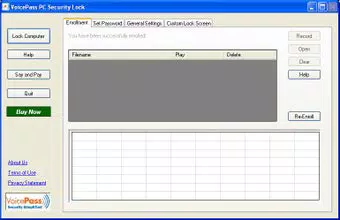
The interface of VoicePass PC Lock is designed with simplicity and functionality in mind. The app features a clean layout with minimal on-screen clutter, allowing users to navigate through setup and configuration with ease. Visual elements are straightforward, focusing on essential controls such as voice password creation, lock screen customization, and access logs.
Navigation is linear and intuitive, with clear prompts guiding users through each step of the installation and activation process. The app does not require complex menus or hidden settings, which contributes to a smooth onboarding experience. Although the developer did not list formal performance metrics, the app is reported to operate efficiently on standard Windows systems.
Users can expect responsive behavior during voice recognition and lock/unlock operations, with minimal lag. Stability appears to be consistent across different device categories, though specific requirements were not disclosed. The app runs in the background without significantly impacting system resources, ensuring that it does not interfere with other applications.
Responsiveness is maintained during active use, particularly during voice authentication attempts. While the developer did not provide details about battery usage or memory consumption, the app’s lightweight design suggests efficient resource management. Overall, the user experience is optimized for practicality, focusing on security without compromising usability.
Platform Compatibility & Technical Requirements
VoicePass PC Lock is available exclusively for the Windows platform. The current version is 1.0.0, with a file size of 32.1 MB. This indicates a lightweight installation, suitable for systems with moderate storage capacity.
The app is designed to run on Windows operating systems, though the specific minimum OS version was not listed by the developer. Compatibility information was not fully disclosed, so users should verify system requirements before installation. The app does not appear to require high-end hardware, suggesting broad accessibility across various Windows devices.
Although the developer did not specify minimum OS requirements, the app’s small footprint and simple interface imply it can function on older or mid-range systems. Users are advised to ensure their system meets the standard requirements for running Windows applications. The absence of detailed technical specifications means that compatibility with newer or legacy systems cannot be confirmed.
For users seeking to install the app on a specific version of Windows, checking official documentation or contacting the developer may be necessary. Despite the lack of detailed information, the app’s design suggests it is built for broad Windows compatibility.
Pros and Cons
- Simple, fast setup process with no technical expertise required
- Customizable voice password with support for multiple languages
- Personalized lock screen with video and image options
- Real-time access monitoring for enhanced security awareness
- 14-day risk-free trial with no credit card needed
- Specific system requirements were not listed by the developer
- Performance on older or low-end systems was not verified
- App size and version details are limited to basic information
- Developer did not provide details on data privacy or storage practices
- Compatibility with newer Windows versions was not confirmed
FAQ
Is VoicePass PC Lock compatible with all Windows versions?
The developer did not specify minimum OS requirements, so compatibility with all Windows versions cannot be confirmed. Users should verify system compatibility before installation.
How secure is the voice password feature?
VoicePass PC Lock uses voice recognition to authenticate users, offering a biometric alternative to traditional passwords. While the exact security protocols were not disclosed, the app is designed to prevent unauthorized access through voice-based verification.
Can I use VoicePass on multiple devices?
The provided information does not indicate whether the app supports multiple device installations. Users should consult the official documentation or contact the developer for details on licensing and device usage.
Is there a free version of VoicePass PC Lock?
While a 14-day risk-free trial is available, the app is not free. The full version is priced at $29.99, and no free version was mentioned in the provided details.
How do I update VoicePass PC Lock?
Updates are likely managed through the official distribution channel. Users should check for updates via the app or the developer’s website to ensure they have the latest version.
Final Thoughts
VoicePass PC Lock presents a modern, user-centric approach to computer security by integrating voice recognition into the login process. Its ability to replace complex passwords with customizable voice commands makes it a compelling choice for users seeking both convenience and protection. The app’s intuitive design, quick setup, and access monitoring features enhance its value, particularly for individuals who manage sensitive data.
The inclusion of a risk-free trial allows users to evaluate the app’s performance without financial commitment. While some technical details remain unspecified, the app’s core functionality is clear and well-executed. It stands out in the security category by offering a biometric alternative that is both accessible and practical.
Whether used at home, in the office, or in shared environments, VoicePass PC Lock delivers a meaningful improvement in user experience and system protection. For anyone looking to secure their Windows PC with a smarter, more natural method, this app is a strong contender. Download VoicePass PC Lock now.


